
What your licence includes
Your licence gives you:
- Use of the AIQ Ecommerce Products plugin on the domains registered against your Client Key.
- Access to the AIQ Ecommerce API through the Deeproots licensing service for the venues on your account. You do not supply, hold or manage a AIQ Ecommerce API key.
- Plugin updates for the term of your licence.
- Support from Deeproots.
What it is issued as: one Client Key, in the form CLT_ followed by 24 characters, sent in your licence e-mail.
One key, however many accounts
If you run several AIQ Ecommerce accounts — different licensed entities, different regions — you still get one Client Key. The licensing service works out which AIQ Ecommerce account can serve each venue and uses the right credential automatically. From your side there is one key and one list of venues.
Adding a staging or development site
Staging domains are registered against your existing licence. You do not need a second licence, and there is normally no extra charge.
How to set one up
- Tell support the staging domain — for example
staging.yourdispensary.com. - Wait for confirmation that it is registered.
- Use the same Client Key on the staging site.
- Run Test Connection to confirm.
A recommendation for staging
Set staging to Sync only mode. It keeps products flowing for design work, and stops anyone accidentally creating a real cart or a real order from a test site:
AIQ Ecommerce Products → API Settings → General → Plugin Mode → Sync only
Pointing staging at a different licensing service
If you are testing against a separate licensing environment, override the endpoint in wp-config.php:
define('DISPENSE_GATEWAY_URL', 'https://staging-licensing.deeproots.io');Plain HTTP is refused unless WP_DEBUG is on, so a mistyped constant cannot quietly send your key over an unencrypted connection.
Local development
Local sites — .local, .test — usually cannot be registered, because they are not real domains. For local work, either:
- Use a real subdomain that we can register, or
- Work with a database copy from staging and accept that syncing will not run locally.
What happens if a licence is withdrawn
This is the section worth reading closely, because the answer is deliberately gentler than people expect.
A licence stops working when the Client Key is revoked or expires, when a domain is removed or disabled, or when the key is removed from the site.
What stops
- Syncing stops on the very next request. No new products, no price updates, no stock updates, no new offers.
- The cart stops working, in Full storefront mode. Add-to-cart reports a temporary failure rather than throwing an error.
- Checkout stops working.
- The live detail shortcodes stop returning data.
What does not stop
That is the design principle, and it is worth stating in full:
- Every product post stays in WordPress, published and visible.
- Every category, brand, offer and venue term stays.
- Every page you built stays, and keeps rendering.
- Prices and stock stay at their last synced values.
- Nothing is deleted, unpublished or hidden.
A billing or infrastructure problem must never blank a live storefront. Your site keeps serving pages; it just stops learning anything new.
What you see in the admin
A red notice explaining the specific problem, with a link to the settings, and the same message on the Licence tab.
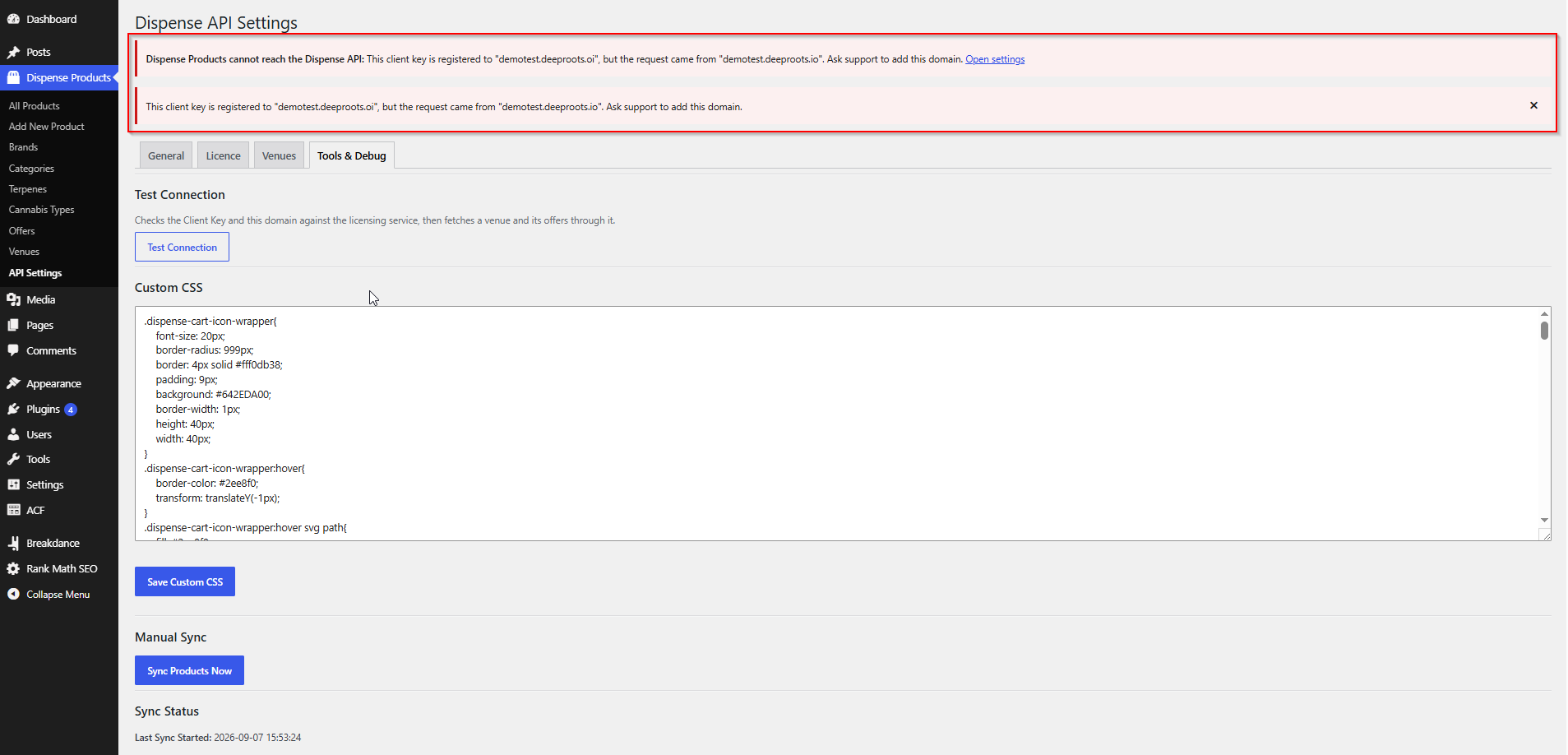
Getting it back
Resolve the underlying issue — usually billing, or a domain to register — and syncing resumes on the next request. There is nothing to reactivate on your side, because there is no cached status to clear.
If you stop using the plugin
- Deactivating it leaves your products in the database. Reactivating brings them back.
- Deleting it removes the plugin files. Your product posts remain until you delete them, though the post type will no longer be registered so they will not display.
- Removing the Client Key stops syncing and leaves everything else alone.
Failure behaviour at a glance
The plugin is deliberately conservative when something goes wrong:
| Situation | What happens |
|---|---|
| The licensing service is unreachable during a sync | The sync is skipped and retried next cycle. No products are deleted or unpublished. |
| The licensing service is unreachable during add-to-cart | The cart reports a temporary failure. No fatal error. |
| Client Key revoked or expired | Syncing stops, an admin notice explains why. Published products stay visible. |
| Domain not registered | A hard stop, with a notice naming both domains. |
| AIQ Ecommerce itself is down | The licensing service serves its last known-good copy where it can. |
| A venue's request fails mid-sync | Offer pruning is skipped entirely, so valid offers are never stripped by a transient error. |
Keeping your key safe
Your Client Key is not a AIQ Ecommerce credential, but it is the only thing between a stranger and your catalogue.
- Do not commit it to a public repository.
- Do not post it in a public forum or a support thread.
- Do not send it by e-mail unless we ask through a secure channel — we can identify your account from your domain.
- Tell us if it is exposed and we will issue a replacement.
Being domain-bound limits the damage considerably, but a replacement is quick and free.
Common problems
I cannot find my Client Key.
Search your e-mail for your licence message. If it is genuinely gone, contact support — do not guess at it.
Where is my licence expiry date?
The plugin does not hold one. The licensing service is asked on every request, so there is nothing local to show. Your account manager has the commercial dates.
I moved my site and everything stopped syncing.
The new domain is not registered. Contact support with both domains from the error message. Your storefront is still online in the meantime.
Do I need a separate licence for staging?
No. The staging domain is added to your existing licence.
Can I use one licence on two live sites?
Both domains have to be registered. Talk to your account manager about whether your licence covers that.