
What information is imported for each product
Each product becomes a WordPress post of type dispense_product.
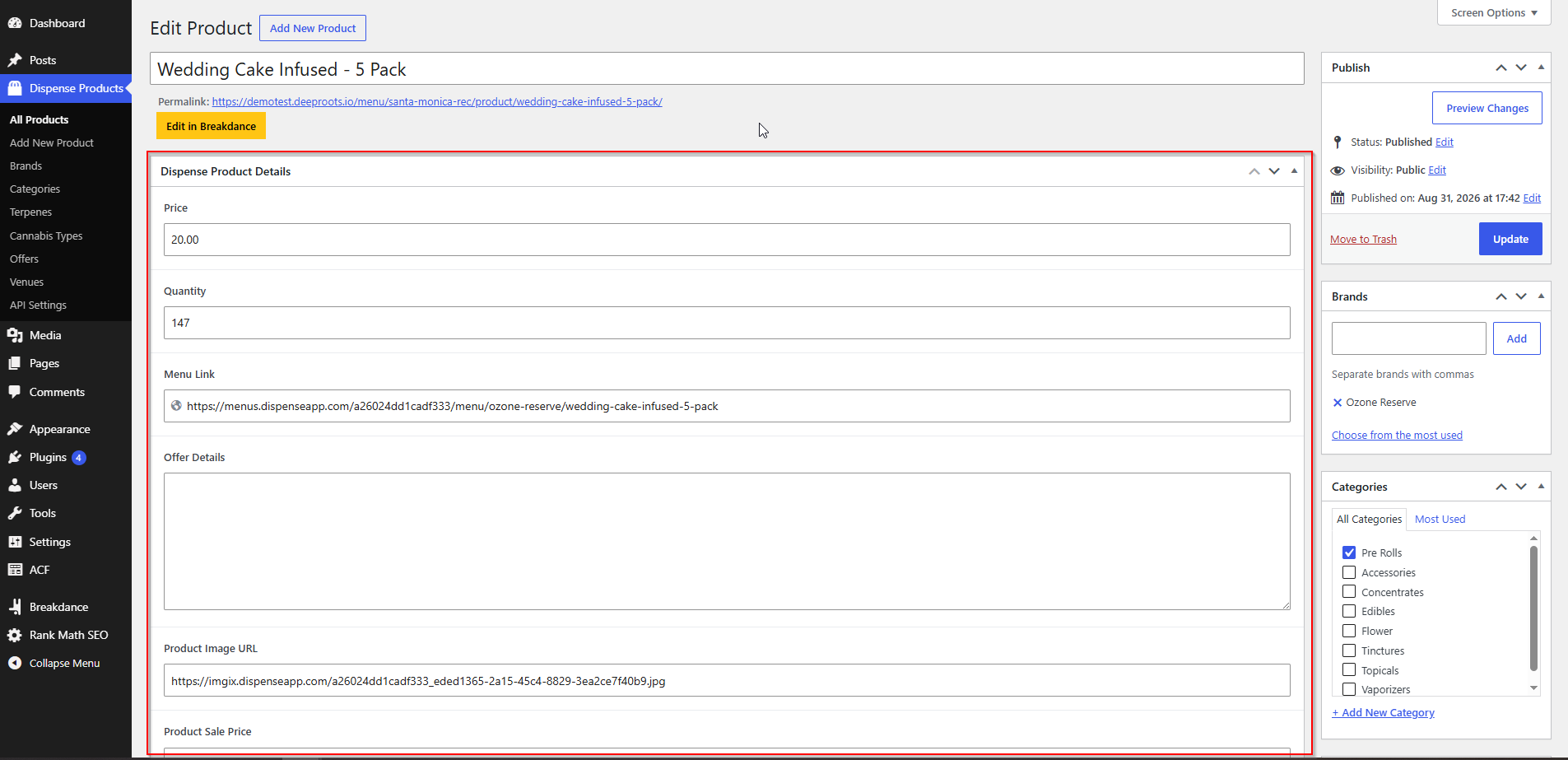
Standard post fields
| WordPress field | From AIQ Ecommerce |
|---|---|
| Post title | Product name |
| Post content | Product description |
| Post status | Published (products in AIQ Ecommerce are only imported when enabled) |
Custom fields
These are what your templates and page builders read.
| Field | Key | Contains |
|---|---|---|
| Product ID | dispense_product_id |
The product's unique ID in AIQ Ecommerce |
| Price | dispense_product_price |
Standard price, formatted to two decimal places |
| Sale Price | dispense_product_sale_price |
Discounted price, when the product is on a percentage sale or has a sale price set |
| Quantity | dispense_product_quantity |
Stock quantity available |
| Image URL | dispense_product_image_url |
The product image, served from AIQ Ecommerce |
| Menu Link | dispense_product_menu_link |
The product's page on your hosted AIQ Ecommerce menu |
| Offer Details | dispense_product_offer |
Comma-separated names of the offers applied to it |
Two of these deserve a note:
- Menu Link is what makes Sync only mode work. It is the address of this product on your hosted AIQ Ecommerce menu, and it is what your product cards should link to when the cart is not running on your site.
- Sale Price is filled in when AIQ Ecommerce sends a sale price directly, and also calculated when a percentage
SALEdiscount applies to the product. A product on a percentage sale also gets added to a category called Sale, which makes a “what’s on offer” listing very easy to build.
Taxonomies
| Taxonomy | Key | URL |
|---|---|---|
| Brand | dispense_brand |
/brand/{slug}/ |
| Category | dispense_category |
/categories/{slug}/ |
| Offer | dispense_offer |
/offers/{slug}/ (base configurable) |
| Terpenes | dispense_terpenes |
/terpenes/{slug}/ |
| Cannabis Type | dispense_cannabis_type |
/cannabis_type/{slug}/ |
| Venue | dispense_venue_tax |
/dispense-venue/{slug}/ |
Each of these has a public archive, so /brand/northern-lights-co/ lists that brand’s products without you building anything.
Brands
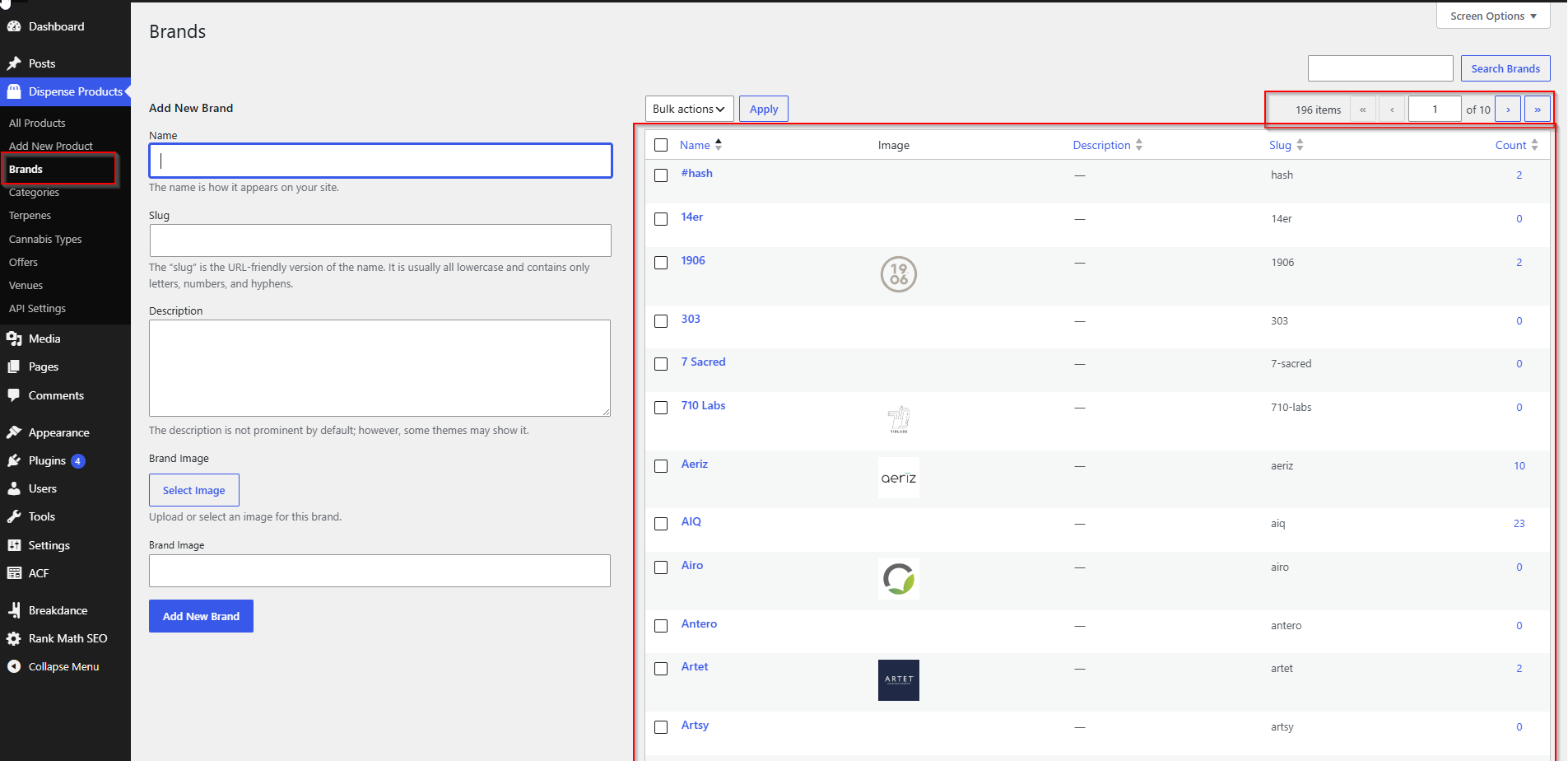
Brands are created automatically from the product data. You will find them at AIQ Ecommerce Products → Brands.
Brand logos
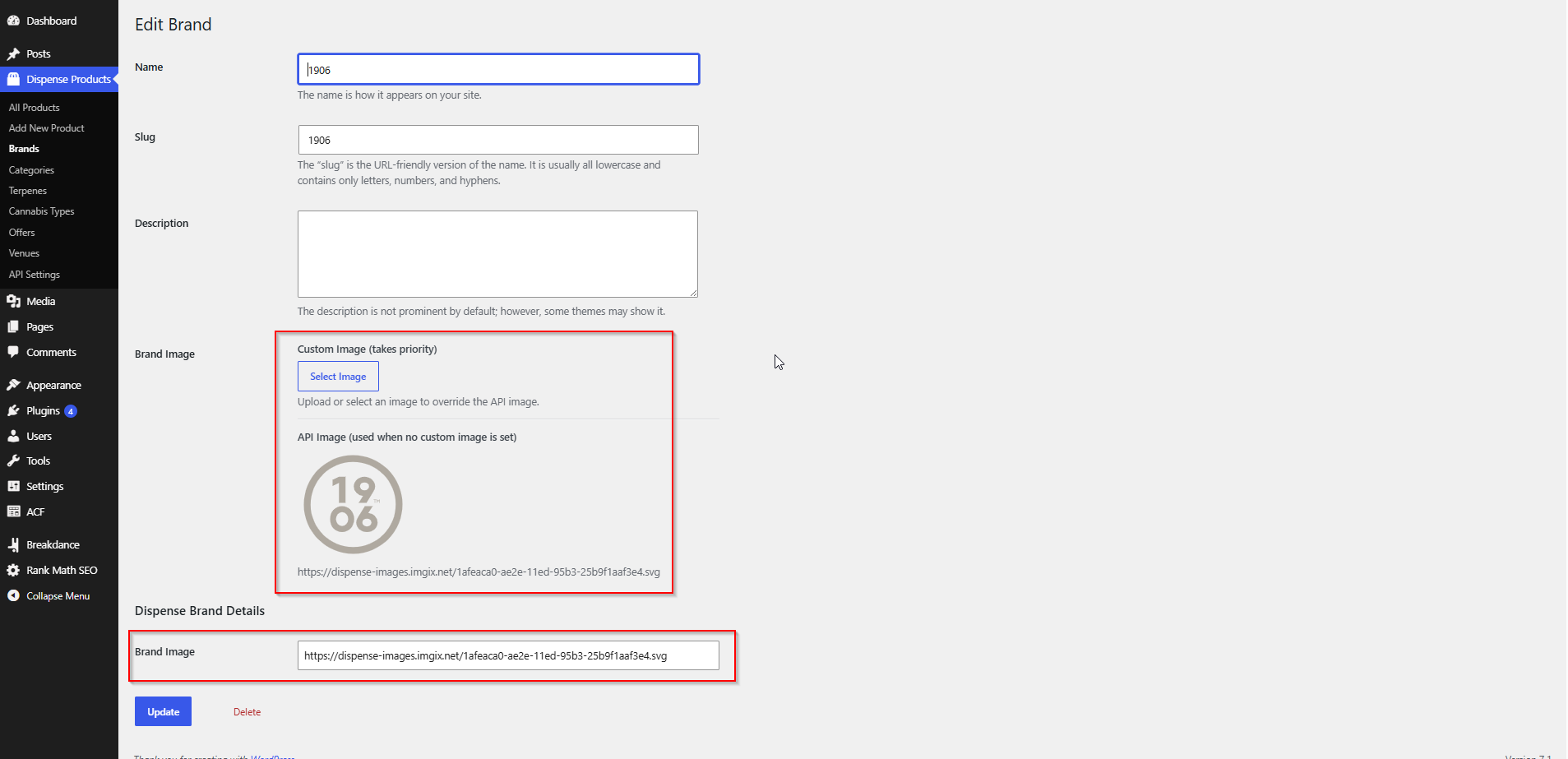
The brand logo comes from AIQ Ecommerce and is stored on the brand term. You can also upload your own on the brand’s edit screen, which is useful when the supplied logo is low resolution or the wrong shape for your design.
A manual upload always wins. Once you have uploaded an image, later syncs will not overwrite it — the AIQ Ecommerce logo is kept separately in the background, but your choice is what displays.
Using brand data on the front end
| Where | How |
|---|---|
| Shortcode, image tag | [dispense_brand_image] |
| Shortcode, URL only | [dispense_brand_image_url] |
| Bricks / Breakdance | dispense_brand_image_url, dispense_brand_name |
Both shortcodes work out which brand you mean automatically — on a brand archive, inside a term loop, or from the brand assigned to the product being displayed. Pass term_id="123" to target a specific brand instead.
Brand pages
/brand/{slug}/ works out of the box. To design it, build a taxonomy archive template for dispense_brand in your page builder. If you use FacetWP, the brand facet can be pre-selected automatically on these pages — see Product Filtering & Search.
Categories
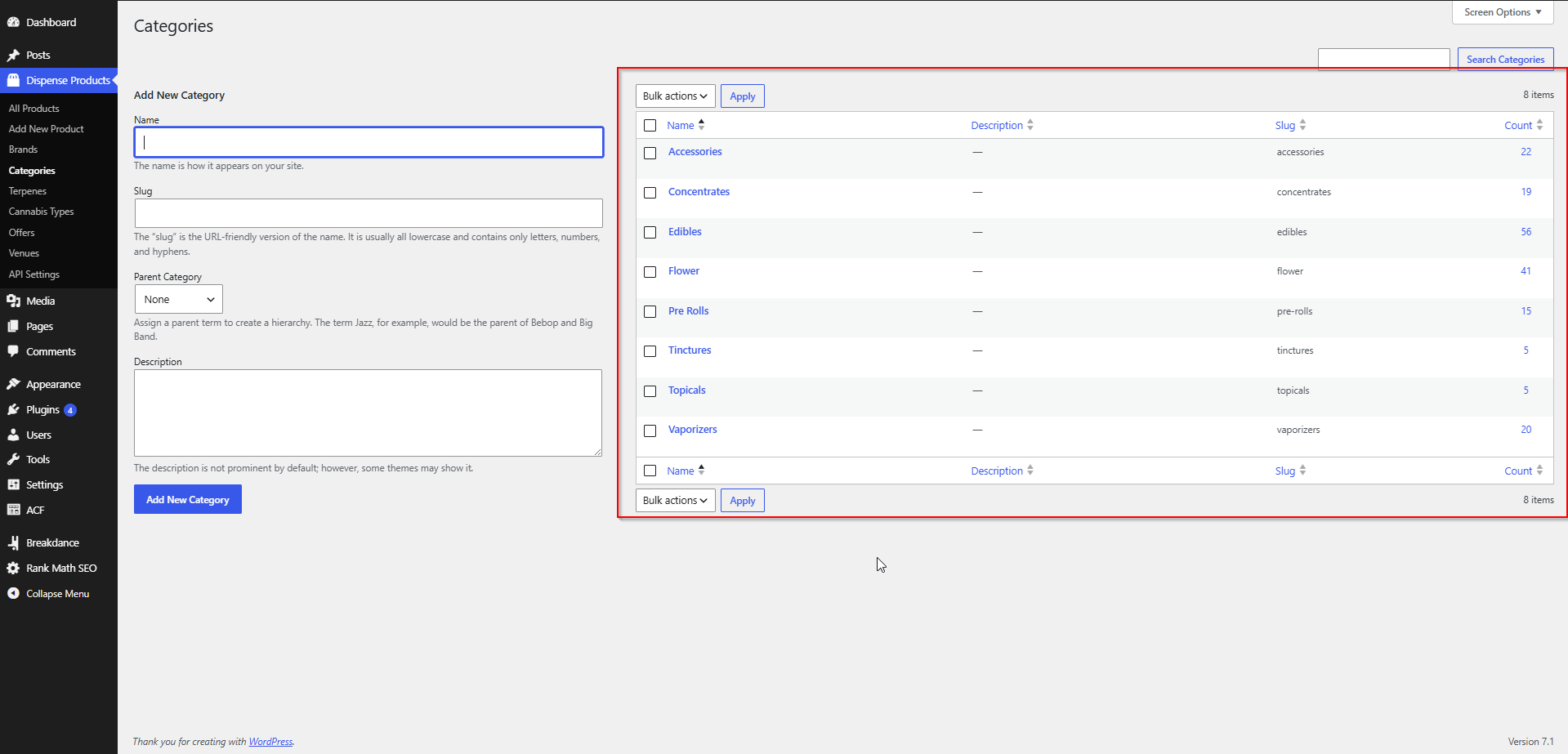
Categories come from AIQ Ecommerce’s product categories — Flower, Edibles, Concentrates, Pre-Rolls and so on. Find them at AIQ Ecommerce Products → Categories.
They behave like ordinary WordPress taxonomy terms, so you can:
- Reorder or rename them for display (see the warning about renaming below)
- Add descriptions that show on category pages
- Nest them, if your structure calls for it
Category archives live at /categories/{slug}/, or /{base-slug}/{venue}/categories/{slug}/ when you use Localized URLs. The number of products per page comes from Products Per Page on the General tab, which defaults to 8.
The “Sale” category
The plugin creates a category called Sale and adds any product with a sale price to it. Building a sale listing is then just a category archive or a query loop on that term.
Cannabis types and strains
Cannabis type — Indica, Sativa, Hybrid and so on — is imported into the Cannabis Type taxonomy (dispense_cannabis_type), with an archive at /cannabis_type/{slug}/.
Show it on a product page with:
[dispense_product_cannabis_type]This shortcode fetches the value from AIQ Ecommerce for the product being displayed, so it is accurate even for detail that is not stored on the post.
Terpenes and potency information
Terpene results come from the product’s lab data. Each terpene present is created as a term in the Terpenes taxonomy, with readable names rather than raw data keys:
| Data key | Term created |
|---|---|
alphaPinene |
Alpha Pinene |
betaCaryophyllene |
Beta Caryophyllene |
betaMyrcene |
Beta Myrcene |
betaPinene |
Beta Pinene |
bisabolol |
Bisabolol |
caryophylleneOxide |
Caryophyllene Oxide |
guaiol |
Guaiol |
humulene |
Humulene |
limonene |
Limonene |
linalool |
Linalool |
ocimene |
Ocimene |
terpinene |
Terpinene |
terpinolene |
Terpinolene |
threeCarene |
Three Carene |
transNerolidol |
Trans Nerolidol |
betaEudesmol |
Beta Eudesmol |
Terpene terms are replaced wholesale on each sync, so a product’s terpene list always matches its current lab data rather than accumulating old results.
Showing potency and lab data
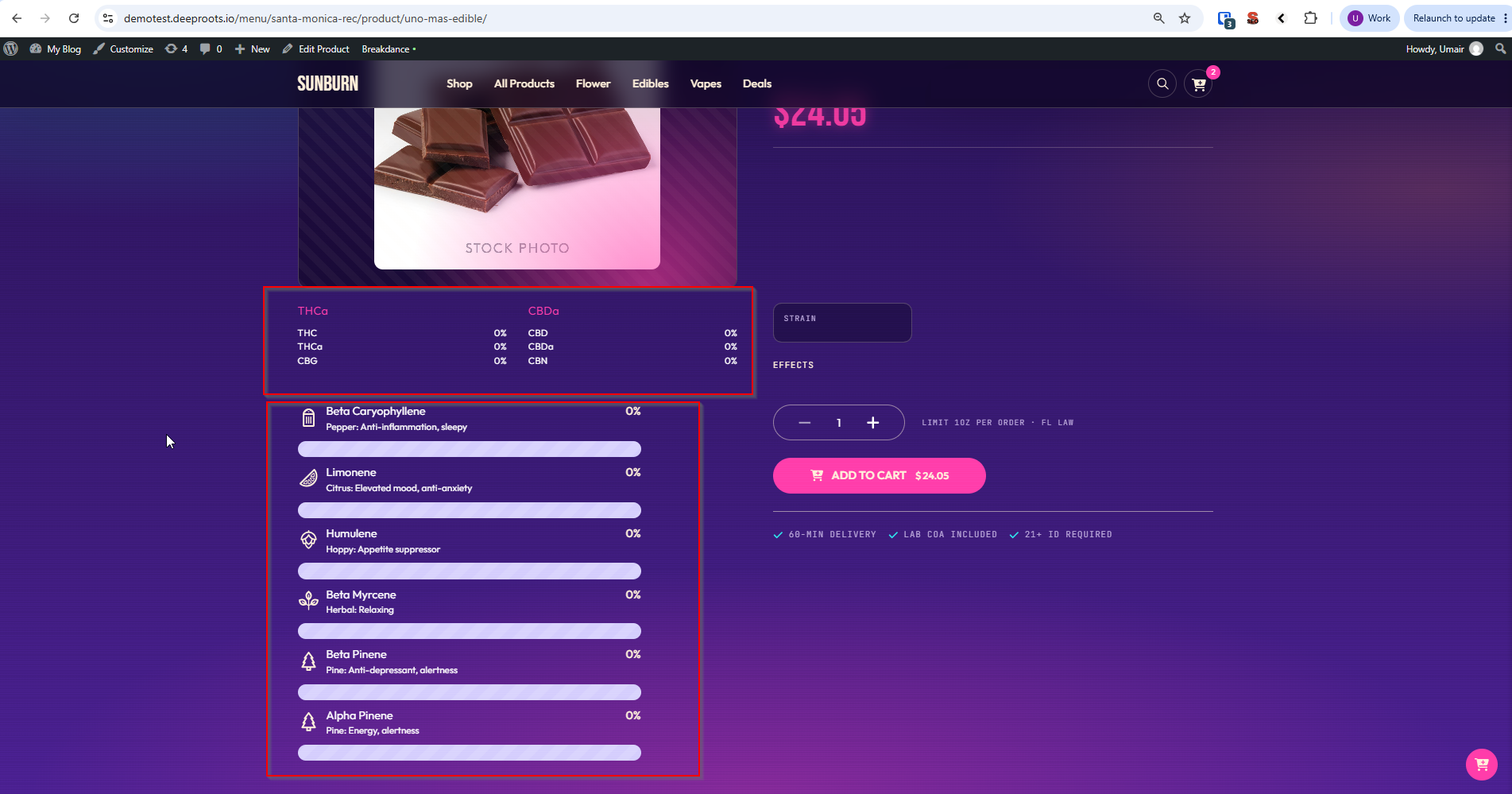
Four shortcodes fetch detailed product data live from AIQ Ecommerce for the product being displayed:
| Shortcode | Shows |
|---|---|
[dispense_product_cannabinoids] |
Cannabinoid figures — THC, CBD and so on |
[dispense_product_terpenes] |
The terpene list |
[dispense_product_terpenes_type] |
The dominant terpene type |
[dispense_product_effects] |
Reported effects |
These call the API when the page renders rather than reading stored fields, so they show the most current lab data — but they also make the page slower and are why product pages must never be served from a page cache. See Caching & Site Speed.
Editing product content, and what gets overwritten on the next sync
This is the part most worth understanding before you invest time in editing.
Overwritten on every sync
| What | Why |
|---|---|
| Product title | Re-read from the product name |
| Product description (post content) | Re-read from AIQ Ecommerce |
| Price, sale price, quantity | Re-read |
| Image URL | Re-read |
| Menu link | Re-read |
| Offers, brand, category, cannabis type, terpenes | Re-assigned from current data |
Anything you type into these will be replaced. If you rewrite a product description in WordPress, it lasts until the next sync — half an hour, by default.
Kept
| What | Why |
|---|---|
| Manually uploaded brand logos | The sync deliberately never overwrites a manual upload |
| Custom fields you add yourself | The plugin only touches its own dispense_* fields |
| Category and brand term descriptions | Descriptions are yours; only term assignment is managed |
| Your templates and page designs | Entirely separate from the data |
If you want custom product copy
Do not edit the imported description — it will not survive. Instead:
- Change it in AIQ Ecommerce. Best option: the description is right everywhere, including your hosted menu.
- Add your own custom field (with ACF or similar) alongside the imported ones, and have your template prefer yours when it is filled in. The plugin will not touch a field it does not own.
If a product is deleted and comes back
Deletion is permanent — the post is removed, not trashed. If the product returns in AIQ Ecommerce the next sync recreates it as a new post, so any manual work attached to the old one is gone. That is another reason to keep custom content in AIQ Ecommerce or in your own fields.
Common problems
I edited a product description and it reverted.
Expected. Imported content is replaced on every sync. Edit it in AIQ Ecommerce instead.
The brand logo I uploaded disappeared.
Manual uploads are preserved, so check the upload actually saved on the brand term, and that you uploaded it on the brand rather than on a product.
A category I renamed came back under its old name.
Categories are matched by name during the sync. Rename the display in your template, not the term.
Terpenes show on some products and not others.
Terpene terms only exist where AIQ Ecommerce has lab data for that product. No lab data, no terms.
The detail shortcodes show nothing.
They fetch from AIQ Ecommerce at page-render time, so they need a working connection and a product with that data. Check Test Connection on the Tools & Debug tab, and check the page is not being served from a cache.