
How to read this article
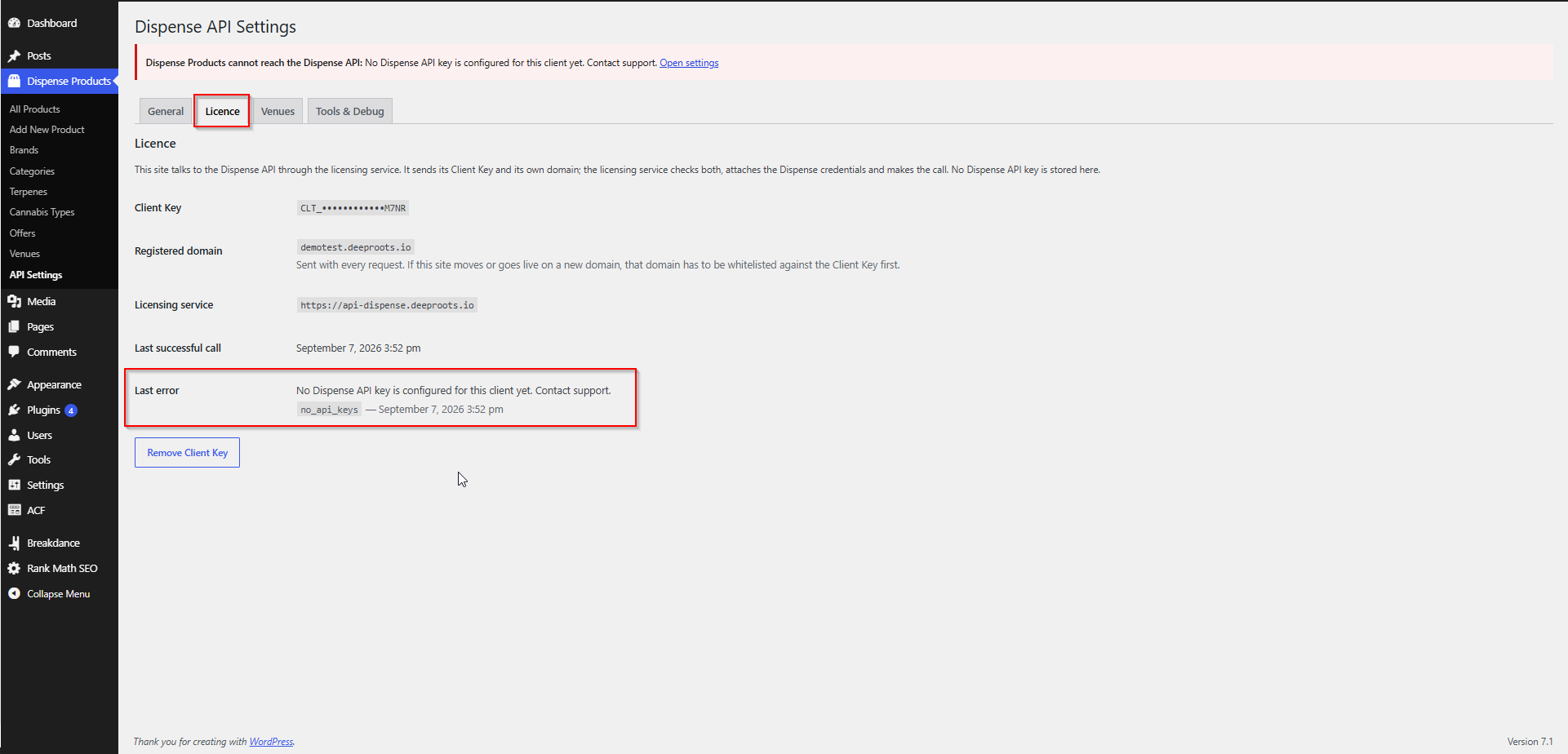
Errors appear in three places:
| Where | When |
|---|---|
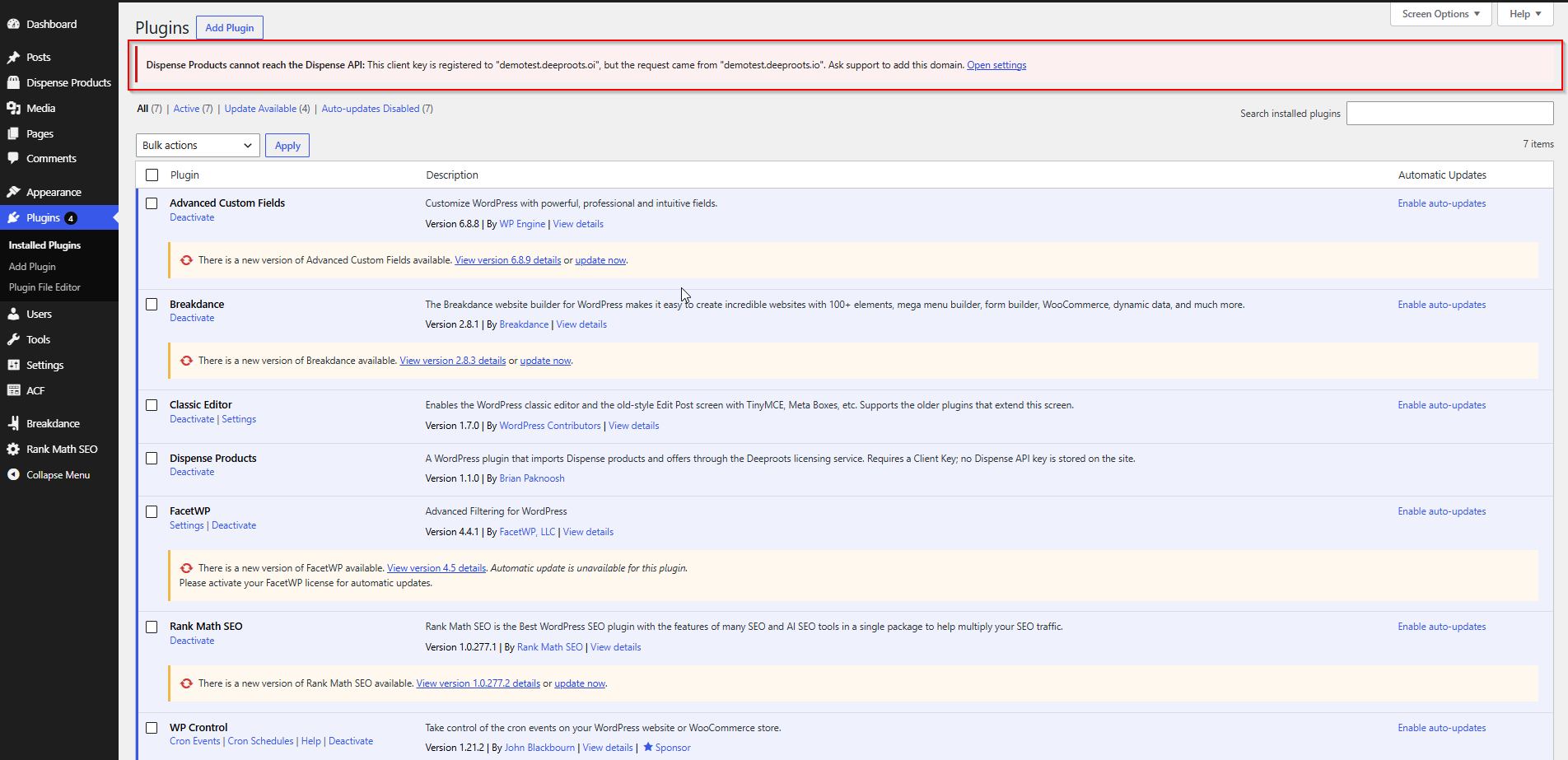
| A notice at the top of the WordPress admin | Something is blocking syncing and needs attention |
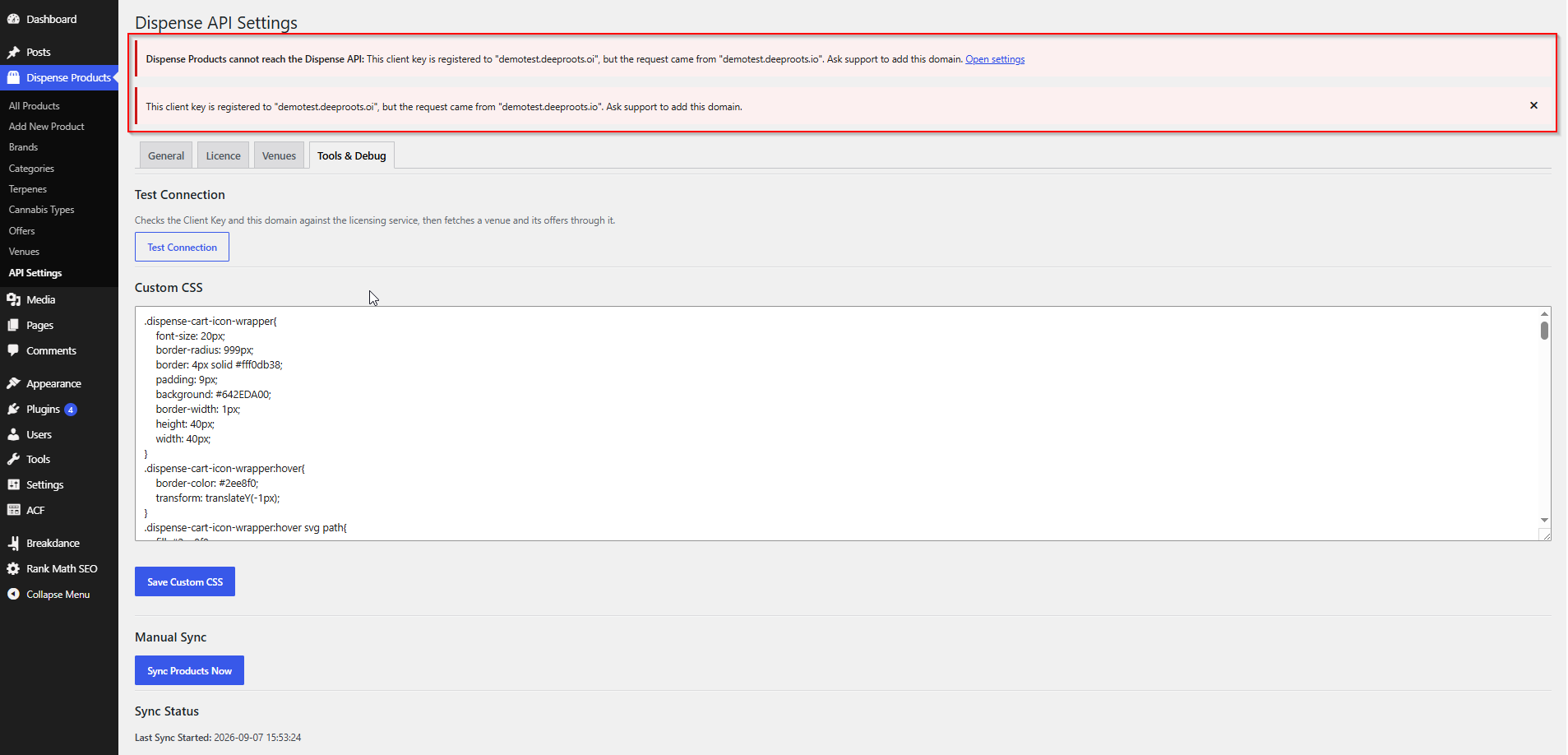
| The Tools & Debug tab | After running Test Connection or a manual sync |
| The Licence tab, "Last error" | The most recent refusal, with its code and time |
Every entry below gives the message, what it means, and what to do.
Licence and key errors
“AIQ Ecommerce Products is not licensed yet.”
Code: client_key_missing
Means: no Client Key is saved on this site. Normal immediately after installing.
Do: paste your key into AIQ Ecommerce Products → API Settings → General → Client Key and save. If you do not have one, contact support.
“That does not look like a Client Key.”
Means: a format check, shown next to the field. The key you saved does not match the expected shape.
Do: check for a stray space when pasting, and check you copied the whole key. This is a warning, not a refusal — the licensing service is the authority on whether a key is real. Run Test Connection to find out.
“That client key was not recognised.”
Code: client_key_invalid
Means: the key reached the licensing service and does not exist there.
Do:
- Compare it character by character with your licence e-mail.
- Check for a leading or trailing space.
- Re-paste and save.
- If it still fails, contact support for a replacement.
“This client key is no longer active.”
Code: client_key_revoked
Means: the key was valid but has been deactivated — usually a billing matter or an account change.
Do: contact support or your account manager.
Meanwhile: syncing has stopped. Your products stay published and your storefront keeps working. Prices and stock simply stop updating.
“No AIQ Ecommerce API key is configured for this client yet.”
Code: no_api_keys
Means: your Client Key is valid, but no AIQ Ecommerce credential has been attached to your account on the licensing service. An incomplete setup at our end, not a problem on your site.
Do: contact support. This one is ours to fix.
Domain errors
“This client key is registered to “…”, but the request came from “…”.”
Code: domain_mismatch
Means: exactly what it says — and the message names both domains so you can see the difference.
The three usual causes:
- The site moved to a new domain.
- The site went live from staging, and only the staging domain was registered.
- You are working on a staging copy that was never registered.
Do: ask support to register the domain. Include both domains from the message.
Note the details: www.example.com and example.com are different domains, as are .com and .co.uk. The domain the plugin sends comes from Settings → General → Site Address (URL).
“No domain is registered for this client key yet, so “…” cannot be authorised.”
Code: domain_mismatch
Means: the key is valid but has no domains registered against it at all.
Do: contact support with the domain you need registered.
“The domain “…” is registered for this client key but is currently disabled.”
Code: domain_inactive
Means: the domain is on your licence but has been switched off — often a staging domain disabled after launch.
Do: contact support to re-enable it, if it should be active.
“This site has no resolvable domain, so it cannot be authorised.”
Code: domain_missing
Means: the plugin could not work out what domain this site is on. Rare — usually a local development environment or a broken Site Address setting.
Do: check Settings → General → Site Address (URL) is a proper URL.
“The site domain sent with this request is not a valid host name.”
Code: domain_invalid
Means: the domain was sent but is not a valid host name.
Do: check Settings → General → Site Address (URL) for a typo — a stray path, port or protocol.
Connection errors
“Could not reach the licensing gateway.”
Code: gateway_unreachable
Means: the request never arrived. The plugin retried twice before giving up.
Do:
- Check your site can make outbound HTTPS requests. Some managed hosts block them or keep an allow-list — ask them to allow
api-dispense.deeproots.io. - Check for a firewall or security plugin blocking outbound calls.
- Try again in a few minutes.
Meanwhile: the sync is skipped and retried on the next cycle. No products are deleted or unpublished.
“The licensing gateway must be reachable over HTTPS.”
Code: gateway_insecure
Means: the licensing service address is configured over plain HTTP, and the plugin refuses to send your Client Key over an unencrypted connection.
Do: check wp-config.php for a DISPENSE_GATEWAY_URL definition and make sure it uses https://. If you did not set one, remove it — the default is correct.
Plain HTTP is only permitted when WP_DEBUG is on, and only for local development.
“The licensing gateway returned a response that could not be read.”
Code: gateway_error
Means: something answered, but not with anything the plugin could understand. Often a proxy, firewall or captive portal intercepting the request.
Do: check whether a security service is intercepting outbound requests. If it persists, contact support with the time it happened.
“Too many requests. Please retry in a moment.”
Code: rate_limited
Means: too many requests in a short period. The plugin backs off and retries automatically.
Do: usually nothing. If it recurs, lengthen your sync interval — a five-minute interval on a large catalogue with several venues can hit limits.
AIQ Ecommerce API errors
“AIQ Ecommerce returned an error for this request.”
Code: upstream_error
Means: the licensing service reached AIQ Ecommerce, and AIQ Ecommerce refused or errored. Not a licence problem.
Do: check AIQ Ecommerce’s own status, try again in a few minutes, and contact support with the time if it persists.
“AIQ Ecommerce did not respond in time.”
Code: upstream_timeout
Means: AIQ Ecommerce was slow to answer. Usually transient, and more likely on very large catalogues.
Do: try again. If it recurs during syncs, lengthen the interval so runs do not overlap.
“No AIQ Ecommerce API key on this account can reach venue “…”.”
Code: venue_not_resolved
Means: the venue is on your licence, but no AIQ Ecommerce credential on your account can serve it.
Usually a venue added to AIQ Ecommerce but not yet attached at our end.
Do: contact support with the venue ID from the message.
“This request needs a venue id so the gateway knows which AIQ Ecommerce account to use.”
Code: venue_required
Means: an internal condition — a request was made without a venue where one is needed.
Do: contact support with what you were doing at the time.
“That AIQ Ecommerce endpoint is not available through the gateway.”
Code: endpoint_not_allowed
Means: the plugin asked for something the licensing service does not permit. Only the endpoints the plugin needs are allowed, deliberately.
Do: contact support. Check first that your plugin version is current.
“That request body is larger than the gateway accepts.”
Code: payload_too_large
Means: the request was too big — in practice, a cart with an unusual number of items.
Do: contact support if a customer hits it.
Sync errors
“No Client Key configured. Skipping scheduled sync.”
Means: the scheduled sync ran, found no Client Key, and stopped before calling anything.
Do: enter your Client Key.
“No venues found.”
Code: no_venues
Means: Test Connection could not find a venue to test with.
Do: check the Venues tab. If it is empty, the licence has no venues attached — contact support.
“No venues are available on this licence. Contact support if that is unexpected.”
Means: the Client Key is valid, the connection works, but the licence has no venues.
Do: contact support.
A red message in the Sync Summary
Whatever the message, look it up above. The important part is what did not happen:
Cart and checkout errors
These appear to visitors on the front end.
“Your cart session expired. Please add items again.”
Code: session_expired
Means: the cart reference was lost.
Do: check that your cache or CDN is not stripping the PHPSESSID, dispense_cart_id or dispense_venue_id cookies. See Caching & Site Speed.
“Could not read your current cart. Please refresh the page and try again.”
Code: fetch_failed
Means: the plugin could not fetch the cart from AIQ Ecommerce, and refused to continue rather than send a partial update that would have replaced the whole cart with one item.
Do: refresh and try again. If it persists, run Test Connection — it is a connection problem.
“You already have a cart from a different venue. Do you want to reset it and start a new one?”
Code: confirm_reset
Means: not an error — a question. A cart belongs to one venue, and the customer is adding something from another.
Do: nothing on your side, though it is worth making the chosen location obvious on a multi-location site.
“Missing parameters” / “No venue associated with product” / “Missing cart or venue”
Means: a cart request arrived incomplete. Usually a product card missing its product ID, or a product whose venue link is broken.
Do: check the Add to Cart button is passing product_id, and run a sync to repair the product’s venue link.
Admin notices
“AIQ Ecommerce Products cannot reach the AIQ Ecommerce API: …”
A red banner across the admin. It appears only for problems that mean this site is not authorised — an invalid, revoked or expired key, or a domain problem. Transient connection failures do not raise it, because they resolve themselves.
The specific message is one of those above. There is an Open settings link beside it.
“AIQ Ecommerce API keys from an older version are still stored on this site.”
Means: you upgraded from 1.0.x and old AIQ Ecommerce credentials are still in the database. They are not used.
Do: save your Client Key on the General tab. That purges them.
“The licensing gateway is configured over plain HTTP.”
Do: fix or remove the DISPENSE_GATEWAY_URL definition in wp-config.php.
Error codes at a glance
| Code | Meaning | Who fixes it |
|---|---|---|
client_key_missing |
No key saved | You |
client_key_invalid |
Key not recognised | You, then support |
client_key_revoked |
Key deactivated | Support |
domain_missing |
No resolvable domain | You |
domain_invalid |
Domain not a valid host | You |
domain_mismatch |
Domain not registered | Support |
domain_inactive |
Domain registered but disabled | Support |
no_api_keys |
No AIQ Ecommerce credential attached | Support |
venue_not_resolved |
No credential can reach that venue | Support |
venue_required |
Request missing a venue | Support |
endpoint_not_allowed |
Endpoint not permitted | Support |
invalid_request |
Malformed request | Support |
rate_limited |
Too many requests | Wait, then lengthen the interval |
gateway_unreachable |
Could not reach the service | You / your host |
gateway_insecure |
Not HTTPS | You |
gateway_error |
Unreadable response | Support |
upstream_error |
AIQ Ecommerce returned an error | Wait, then support |
upstream_timeout |
AIQ Ecommerce too slow | Wait |
payload_too_large |
Request too big | Support |
no_venues |
No venues on the licence | Support |
session_expired |
Cart session lost | You — check caching |
fetch_failed |
Could not read the cart | Retry, then check the connection |
The codes in the “Support” rows are ones only we can resolve. Quote the code when you get in touch.