
Start here
Before working through a specific symptom, three checks resolve a surprising share of problems.
1. Check the connection
AIQ Ecommerce Products → API Settings → Tools & Debug → Test Connection A green result means the licence, the domain and the connection are all fine, and the problem is elsewhere. A red result tells you exactly what is wrong — look it up in Error Messages Explained.
2. Check the sync
Tools & Debug → Sync Status — when did it last run, and did it succeed?
3. Clear your caches
Page cache, object cache, CDN and browser. A remarkable number of “it is broken” reports are a cached copy of an older page.
Products are not appearing
Nothing at all has imported
Work through in order:
- Is a Client Key saved? General tab. Without one, nothing syncs.
- Does Test Connection pass? Tools & Debug tab.
- Is at least one venue ticked? Venues tab. No venues, no products.
- Has a sync actually run? Sync Status. “No sync has been run yet” means it has not.
- Run a manual sync and watch the summary.
If the sync completes with 0 imported and no error, the venues you have ticked genuinely have no products the plugin will import — see below.
Some products are missing
Two rules decide whether a product is imported at all:
- It must be enabled in AIQ Ecommerce. Disabled products are never created, and existing posts for them are deleted.
- A new product must have a product URL on your hosted AIQ Ecommerce menu. The plugin will not create a new post for a product with no menu URL. Products already on your site keep updating either way.
That second rule is the usual explanation for “this one product never shows up”. Check it appears on your hosted menu.
Also check its venue is ticked on the Venues tab.
Products are in the admin but not on the front end
The data is fine; the display is not.
- Is the page using the right shortcode or loop? Check the listing is querying
dispense_product. - Is a filter excluding them? Try the page with no filters applied.
- Flush permalinks — Settings → Permalinks → Save Changes.
- Clear caches.
A single product page 404s
Almost always permalinks. Settings → Permalinks → Save Changes, without changing anything.
If only some products 404, check the product’s slug is unique, and — with Localized URLs — that its venue post still exists, since the URL is built from the venue’s slug.
Products are out of date
Prices or stock are wrong on the front end
Compare three things, in this order:
- AIQ Ecommerce — what is the real price?
- The WordPress admin — open the product and check
dispense_product_price. - The front end — what does a visitor see?
| Where it diverges | Cause |
|---|---|
| AIQ Ecommerce ≠ admin | Sync problem |
| Admin ≠ front end | Caching problem |
If it is a sync problem: check Sync Status for errors, run a manual sync, and check the sync interval is short enough for how often your prices change.
If it is a caching problem: clear every cache, then shorten the cache lifetime on price-bearing pages. See Caching & Site Speed.
An offer has ended but is still showing
Offers are removed on the next sync. Run a manual sync, then clear caches.
A discontinued product is still on the site
Same answer. Stale products are removed at the end of a successful sync — if the last sync failed, no cleanup ran, which is deliberate.
Sync is not running
“Sync in progress” that never finishes
The background job was scheduled but never fired. WordPress’s scheduler only runs when someone visits the site, so on a quiet site nothing triggers it.
- Open your site’s front end in another tab.
- Reload the settings page.
If it recurs, move to a real server cron:
// wp-config.php
define('DISABLE_WP_CRON', true);
*/5 * * * * curl -s https://yoursite.com/wp-cron.php?doing_wp_cron > /dev/null
Scheduled syncs are not happening
- Check the sync interval on the General tab.
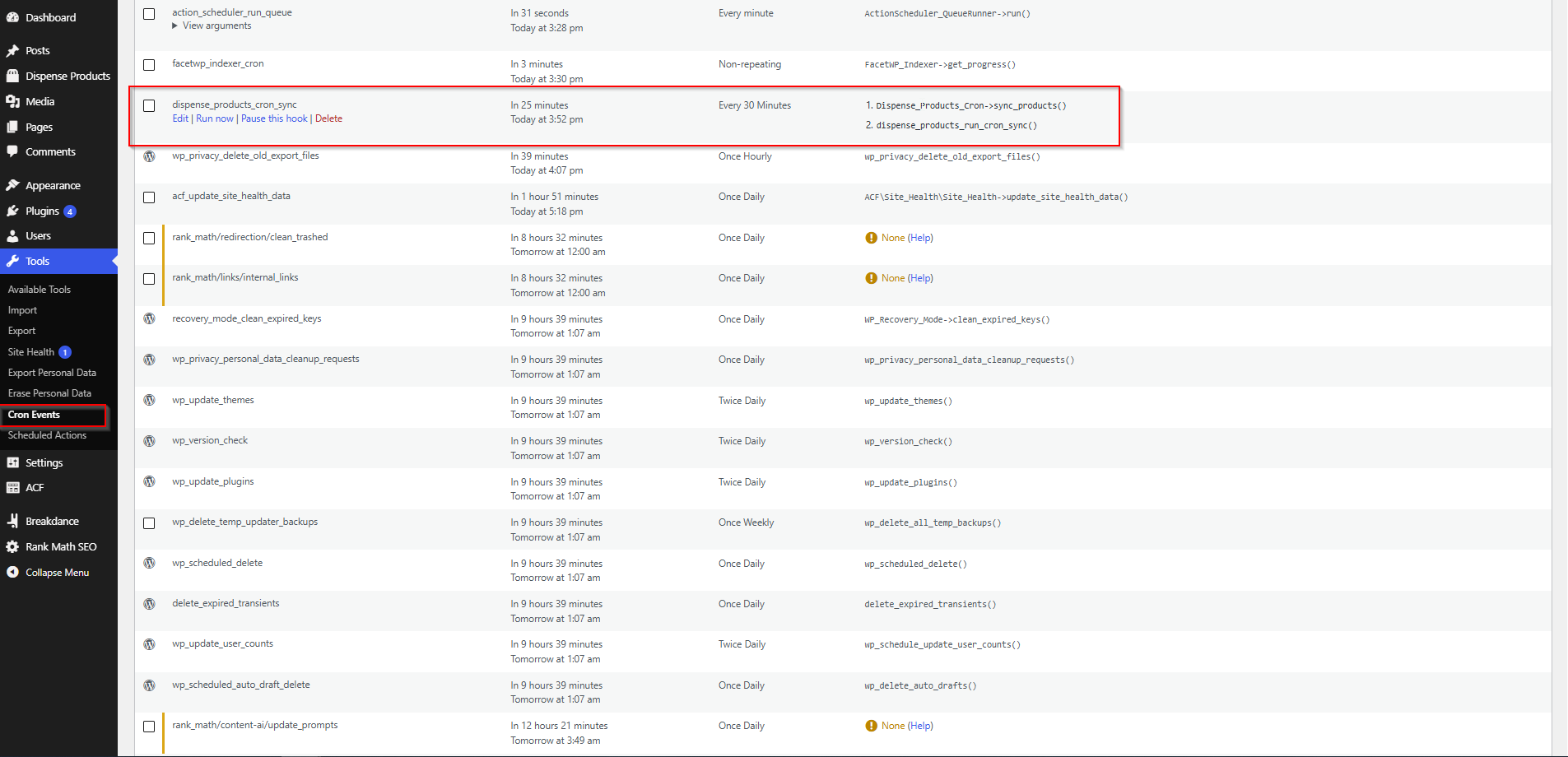
- Check WP-Cron is working — the WP Crontrol plugin shows scheduled events and lets you run
dispense_products_cron_syncby hand. - Check nothing is blocking it — some security plugins block
wp-cron.php. - Check the licence — an unlicensed site skips the sync entirely and says so in the status panel.
The sync starts and fails
Read the red message in the Sync Status panel and look it up in Error Messages Explained.
Nothing is deleted by a failed sync. The cleanup only runs on success.
The sync times out on a large catalogue
The sync gives itself five minutes per run and the cleanup stops after about 200 seconds, so a very large catalogue can be cut short. Nothing is lost — the next run continues.
If it never completes:
- Ask your host to raise
max_execution_timeto 300 andmemory_limitto 256M. - Lengthen the sync interval so runs do not overlap.
- Reduce the number of venues if some are not needed.
Images are missing
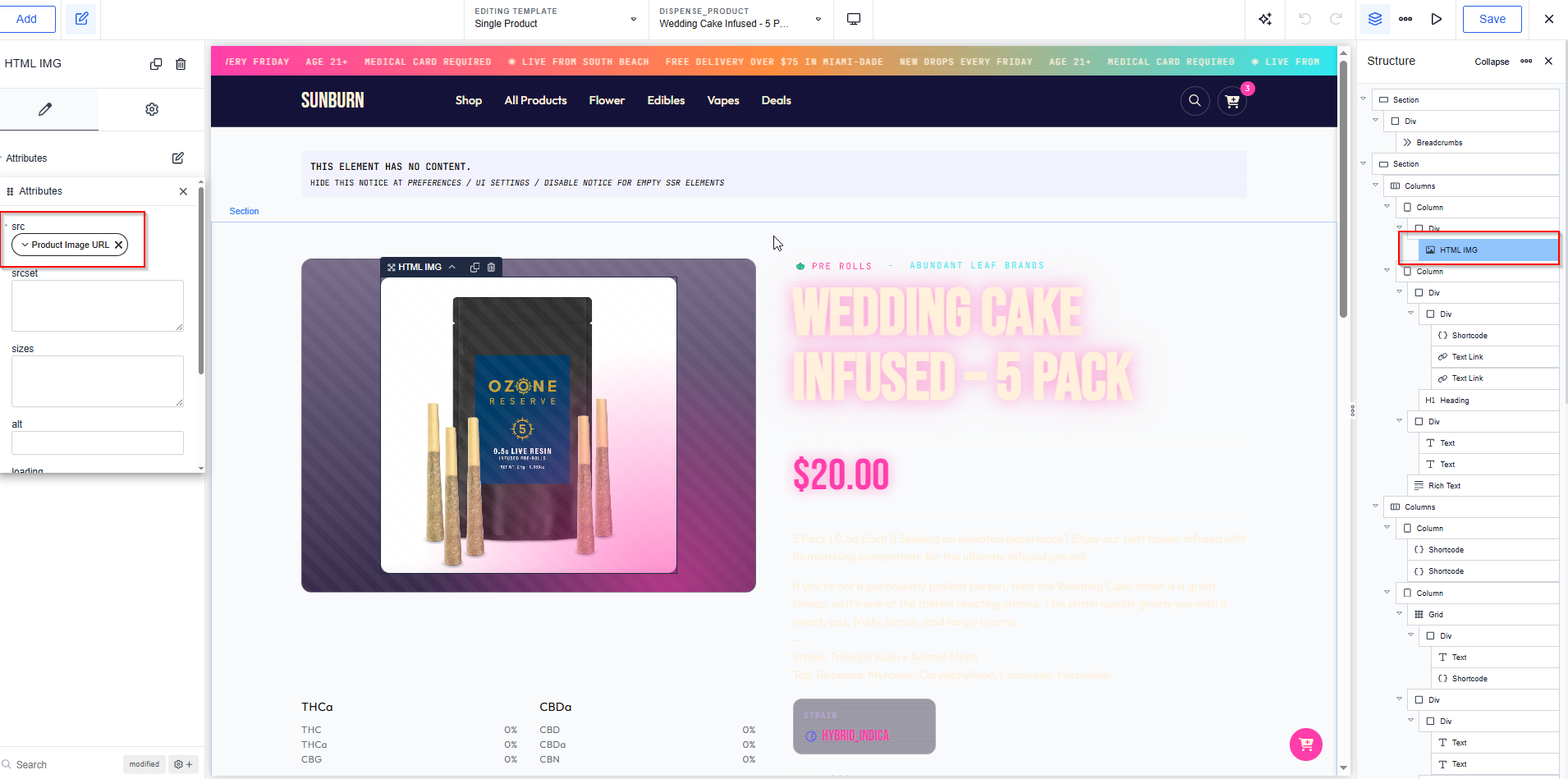
Product images are not stored on your site. The plugin saves the image URL in dispense_product_image_url and the picture is served from AIQ Ecommerce.
So work through:
- Does the product have an image in AIQ Ecommerce? No image there, no image here.
- Is your template outputting
dispense_product_image_url? A page builder Image element bound to “featured image” will find nothing, because products have no featured image. Bind it to the URL field. - Does the URL load on its own? Copy it from the product’s admin screen and open it in a browser. If it does not load there either, the image is missing at source.
- Is something blocking external images? A strict Content Security Policy, or an aggressive privacy plugin, can block them.
The cart is not working
The cart icon does nothing
[dispense_view_cart] is missing from the page. The icon opens the sidebar; with no sidebar there is nothing to open. Put it in a global template area so it exists everywhere.
The count badge stays at 0
The count is fetched by JavaScript after the page loads.
- Check the browser console for JavaScript errors.
- Check
admin-ajax.phpis reachable — a cache rule, firewall or security plugin can block it. - Check for a conflicting plugin — another plugin’s JavaScript error stops the cart script running.
- Check optimisation settings — delaying or deferring JavaScript breaks the cart. Exclude
dispense-cart.js.
Add to Cart does nothing
- On a product card: pass the product ID —
[dispense_add_to_cart product_id="{{acf:dispense_product_id}}"].
- Everywhere: check Plugin Mode is Full storefront. In Sync only mode the shortcode renders nothing for visitors.
“Could not read your current cart. Please refresh the page and try again.”
The plugin could not fetch the cart from AIQ Ecommerce, so it refused to proceed — sending a partial update would have replaced the whole cart with one item. Refresh and try again; if it persists, run Test Connection.
“Your cart session expired. Please add items again.”
The session reference was lost. Usually a cache or CDN stripping cookies. Check that PHPSESSID, dispense_cart_id and dispense_venue_id are excluded from cookie-stripping rules.
“You already have a cart from a different venue.”
Expected behaviour, not an error. A cart belongs to one venue. The customer is asked whether to reset and start again. On a multi-location site, make the chosen location obvious before customers start adding items.
The cart empties between pages
Cookies are being stripped by a cache or CDN. The plugin deliberately mirrors the cart reference into a long-lived cookie to survive aggressive session cleanup, so if the cart still empties, something is removing cookies.
Cart shortcodes output nothing
You are in Sync only mode. Administrators see an amber notice; visitors see nothing.
Checkout will not load
The checkout page is blank
- Does the page contain
[dispense_checkout_iframe]? - Does the Checkout Page setting point at that page? Both must agree.
The checkout button goes to the wrong page
Set Checkout Page correctly on the General tab and save.
The frame is cut off or too small
Usually a theme layout problem. Switch to the minimal shell to confirm — if it is fine there, the theme is the cause. A position: fixed sticky header is the usual culprit: fixed elements take up no layout space, so the frame cannot measure around them.
Two scrollbars
The page and the frame are both scrolling. The minimal shell prevents this.
Checkout works logged in but not logged out
Caching. Exclude the checkout page from your page cache and CDN.
The frame will not load at all
- Run Test Connection.
- Check the browser console for a blocked-frame message.
- Check whether a security plugin or a Content Security Policy is blocking frames.
- Check the visitor’s browser is not blocking third-party frames.
Filters are behaving oddly
The filter dropdowns are empty
No terms exist. Run a sync. If products imported but terms did not, check the sync summary.
Filtering shows no products
The combination genuinely has no matches, or the listing is being filtered twice — for example a shortcode attribute fighting an archive’s own filter. Try one filter at a time.
Sorting by price is in a strange order
Products with an empty price sort unpredictably. Check for products with no dispense_product_price. In a page builder, make sure you are ordering by meta value (number) rather than meta value — a text sort puts £100 before £20.
FacetWP facets show no options
The facet source is wrong. It must point at the AIQ Ecommerce taxonomies — dispense_brand, dispense_category — not WordPress’s core categories.
FacetWP filters the counts but not the products
FacetWP is not attached to the listing query. Use [custom_product_filter show_filters="false"] rather than a custom loop, or set FacetWP’s query source explicitly.
The brand facet is not pre-selected on brand pages
The Brand Facet Name does not match. Copy it exactly from FacetWP → Facets, without a leading underscore.
Pagination 404s past page 1
Flush permalinks.
When nothing here fits
Collect the diagnostic details and get in touch — see Getting Help. The more of the following you can include, the faster it is resolved:
- What you did, what you expected, what happened
- The exact error message
- Screenshots of the Sync Status and Licence tabs
- Your site’s domain
- Whether it happens logged out and in a private window